

SQL Delta Help
Schema View Filters
Filters provide a varied method of hiding objects from the tree view.
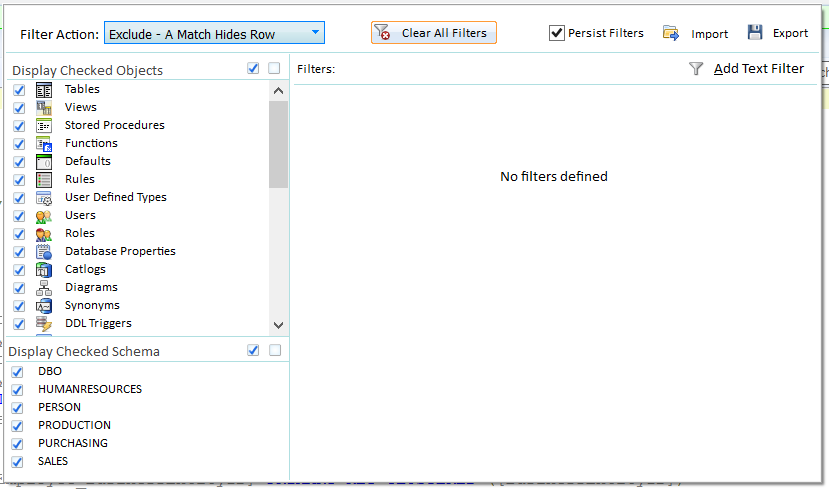
Filter Action
This action determines whether the filter will exclude and hide all objects that match the filter or include and show all results that match the filter (and hiding everything else).
Exclude hides all objects that match the filter.
Include displays all objects that match the filter, hiding the rest.
Object Filters
Object filters are locked system filters that cannot be altered except by checking or de-checking one or more objects from the object type list. Object filters are always an exclusion filter regardless of whether the Filter action is Include or Exclude.
Example
Check Tables and Views and de-check the rest of the objects and only Tables and Views are shown in the tree view.
Schema Filters
Like Object Filters, Schema Filters are a locked system filter and hide objects that belong to the schema/owners that are not checked. Schema filters are always an exclusion filter regardless of whether the Filter action is Include or Exclude.
Text Filters
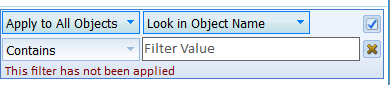
Text filters can be applied to a vast range of objects in various ways. Importantly the text filter is not automatically applied and the tick button must be clicked or enter pressed to accept and apply the text filter. A warning is displayed if the text filter has not been applied.
Apply To: This allows the text filter to be applied to a specific object type, such as a table or view.
Look In: This determines what part of the object to evaluate for the filter. The options are:
Object Type (Table, View, etc), Object Name where this is both object name and schema name if one exists, Name is the object name only, Schema is the schema (or Owner) only, Everything will also load the object SQL contents and search within the contents.
Compare: Determines how the text is compared with the Look In value and the options are:
Contains - a match to any partial text, Starts With - a match where the text equals the start, Ends With - a match where the text equals the end, Equals - the text must be completely equal,
Not Contains, Not Starts With, Not Ends With and not Equals - the inverse of the above,
RegEx accept regular expressions,
In List uses a comma separated list of text and checks to see of the Look In value is within the list,
Not In List is the inverse of In List.
Click the cross button to delete the filter