

SQL Delta Help
Schema Compare Script
Schema Compare scripts are generated from the selected rows in Schema Compare Results. The rows you check, together with the current Depend, Allow Drop, and script-direction settings, determine what SQL Delta places into the deployment script.
Current workflow
- Select the result rows you want to deploy in Schema Compare Results.
- Click Script to generate the deployment SQL in a separate script tab.
- Review the generated notes and the SQL text before choosing Execute.
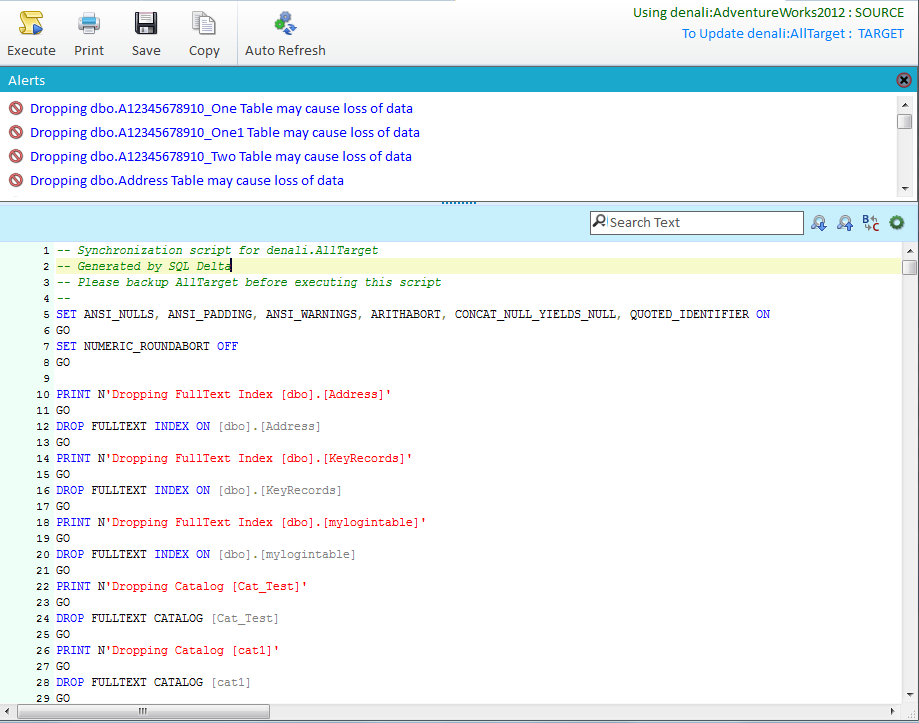
Script tab header and actions
- The header shows the current source and target connections for the script.
- If compare direction was reversed before scripting, the script tab shows the warning Updating Source: this script deploys to the original source database.
- Execute runs the script against the deployment database. Shortcut: F6.
- Print, Save, and Copy work on the current script text.
- Auto Refresh refreshes the original compare after the script tab closes, but only after the script has executed. This option is not available while the compare is running in reversed direction.
Notes and warnings
If script generation returns warnings or dependency notes, SQL Delta opens the notes panel above the editor. Review those messages carefully before execution, especially when the script includes drops, type changes, or switched-direction deployment.
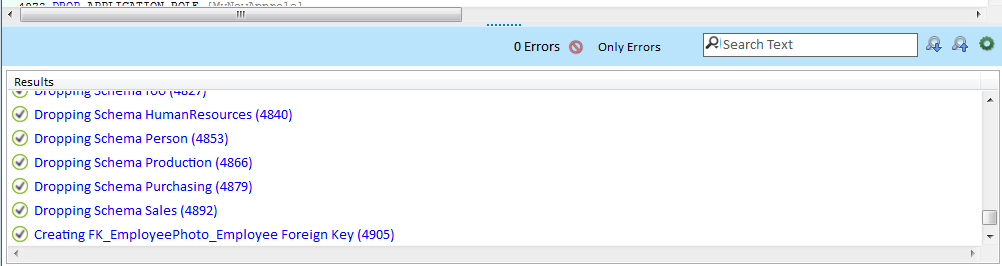
Script editor and execution messages
- The upper editor contains the generated SQL and can be edited before execution.
- The editor supports search, replace, word wrap, special-character display, text-size changes, comment toggling, and bookmarks.
- Switch Window Focus changes focus between the script editor and the lower results pane. Shortcut: F7.
- After execution, the lower pane records the messages returned by the server for the script blocks that were run.
- Only Errors filters the lower pane to failed statements only, and the search box can search through the returned messages.
Running and refreshing
The results in the original Schema Compare tab do not update just because a script tab is open. Re-run the compare, or close the script tab with Auto Refresh enabled after execution, if you want the results tab to reflect the deployed changes.
Closing a script tab while execution is still running prompts for confirmation because terminating a live deployment can leave the target database in a partial state.
The screenshots on this page still reflect an older Schema Compare script layout and should be treated as placeholders until current Version 7 replacements are captured.
See also: Schema Compare Results, Schema Compare Reports, Display Options, and Keyboard Shortcuts.