

SQL Delta Help
Schema Compare Reports
Schema Compare reports are generated from the Print dropdown on Schema Compare Results. SQL Delta creates the report file and opens it in a separate embedded report tab.
Current print options
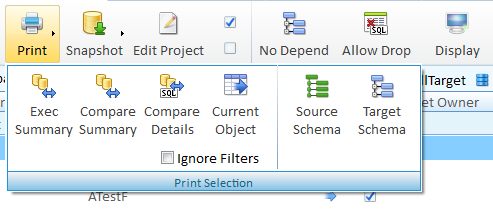
- Exec Summary shows the top-level summary counts for each difference type across the compare.
- Compare Summary expands that summary into the grouped compare output.
- Compare Details adds source and target detail output for the compared objects.
- Selected Object generates the detail report for the currently focused result row only.
- Source Schema and Target Schema generate structure reports for the loaded source or target schema.
Report filters
- Only Checked limits report generation to the objects that are currently checked for scripting.
- Ignore Filters bypasses the active results filter when the report supports object-level filtering.
- These options are taken from the current results state when you click a report button. If you change filters, checked rows, or the selected object later, generate the report again from the results tab.
Report tab
- The report opens in a dedicated embedded browser tab inside SQL Delta.
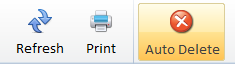
- Refresh reloads the current report file.
- Save saves the displayed report as a PDF.
- Print sends the displayed report to the printer.
- Auto Delete removes the generated report file when the report tab closes.
- The filename shown in the header can be clicked to reveal the generated report file in Windows Explorer.
- The zoom slider changes the report viewer zoom level.
Refresh behavior
Refreshing the report viewer only reloads the existing generated file. To reflect new compare filters, a different selected object, or a rerun compare, generate a fresh report from Schema Compare Results.
The screenshots on this page still reflect an older Schema Compare reports layout and should be treated as placeholders until current Version 7 replacements are captured.
See also: Schema Compare Results, Display Options, and Filters.