

SQL Delta Help
Schema View On Completion
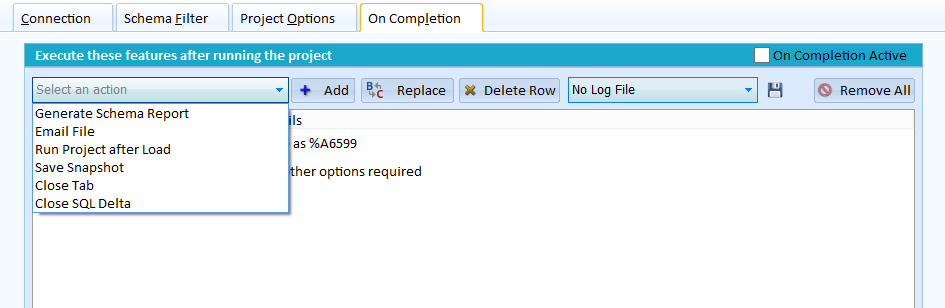
You can define a series of events to fire sequentially after schema view project finishes its run. Historically past versions of SQL Delta provided this feature when a project was run from the command line and the features had to be declared by manually changing the project. Now you can define the on completion features and use them as part of a command line process or within the normal use of SQL Delta.
On Completion Active
To enable on completion events check the On Completion Active check box.
Events
|
Generate Schema Report |
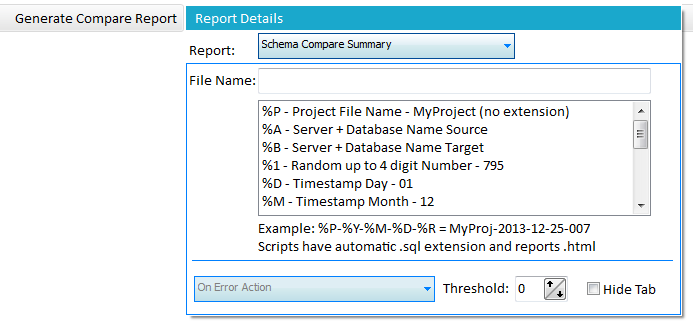
Generates a report showing the schema in a tree style layout. By checking the hide tab option the report will not be shown on screen in a tab but only sent to file. The error action option will prevent generating a report if the error threshold is reached. |
|
Email File |
Once a log, snapshot or report file has been generated it can be emailed as an attachment. See below for more details on configuring an email. System Preferences also contains the system wide settings for sending an email. You will need to configure various SMTP details including the sender's email address. |
|
Run Project after Load |
Run another project once the schema view has been loaded. |
|
Save Snapshot |
Save the database as a snapshot. |
|
Execute a Script |
Runs a custom script after the schema-load workflow. The current editor lets you store the script text, choose source or target execution, decide whether the script should always run, set the wait time, and choose whether to ignore the saved hash check. |
|
Close Tab |
This action will occur last (or second last if Close SQL Delta exists) and closes the tab once all other actions have completed. In this instance running another project finishes once the request to run the project has been issued. |
|
Close SQL Delta |
Once all actions have been completed for this project then Close SQL Delta. |
Log File
A log file can be created for each project run by changing the No Log File drop down to either Create/Overwrite Log file or Create/Append Log file. Click the Save (disk icon) button to configure the log filename. The log file is mainly used in conjunction with command line processing since there may be nothing displayed when running in command line silent mode, the log file reports on the load process.
Filename Options
Depending on the type of file they are automatically saved to the default SQL Delta location as defined in System Preferences. A report will be saved into the report folder and scripts to the script folder. A filename can utilize keywords to customize the name on a project by project basis. Also a keyword can be used to change the folder to a different location. The file name can contain literal characters and an extension although we recommend using the default extensions.
By using a combination of literal characters and keywords a filename can be both descriptive and unique each time the On Completion event is run. If a filename is not unique it will be overwritten without warning.
Keywords
%P = Replace with the Project Filename without the extension
%A = Source Server name + Database name
%B = Target Server + Database name
%1 = A random up to 4 digit number although the number could be a small as a single digit.
%D = Today's Day in DD form
%M = Today's Month in MM form
%Y = Today's Year in YYYY form
%H = Today's hour in HH form
%N = Today's minute in NN form
%S = Today's second in SS form
%Z = Today's millisecond in ZZZ form
Path Keywords
%F = System Settings default Project Folder
%R = System Settings default Report Folder
%O = My Documents folder
%T = System Settings default Script Folder
Report Options
Email Options
To, CC, BCC:
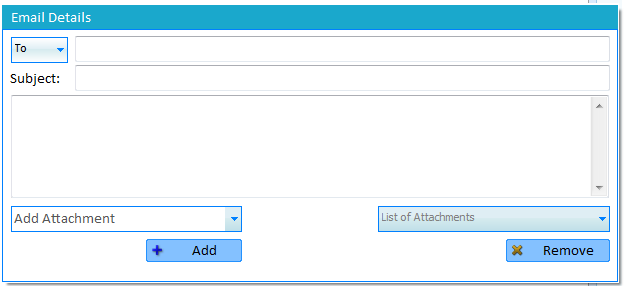
To define the Email To, CC or BCC address click the To drop down to select the style (To, CC or BCC) and then
enter the email address.
Subject:
The subject can contain the filename keywords which also allows some dynamic customization.
Body:
The body of the email.
Add Attachment:
A list of available files within the On Completion events will be shown and each one can be selected and added to the email by pressing the Add button. It isn't possible to send files that are not part of the On Completion list.
List of Attachments:
Displays a list of attachments to be sent with this email. To remove an attachment select the desired file from the List of Attachments and click remove. Additionally the attachment will be automatically removed if the corresponding report or script On Completion event is removed.
The current Email panel also lets you choose whether the message is always sent, only sent when running from the command line, or only sent from the GUI. You can also enable Only Email on difference when the mail should only be sent if the project detected a difference.