

SQL Delta Help
Data Compare Options
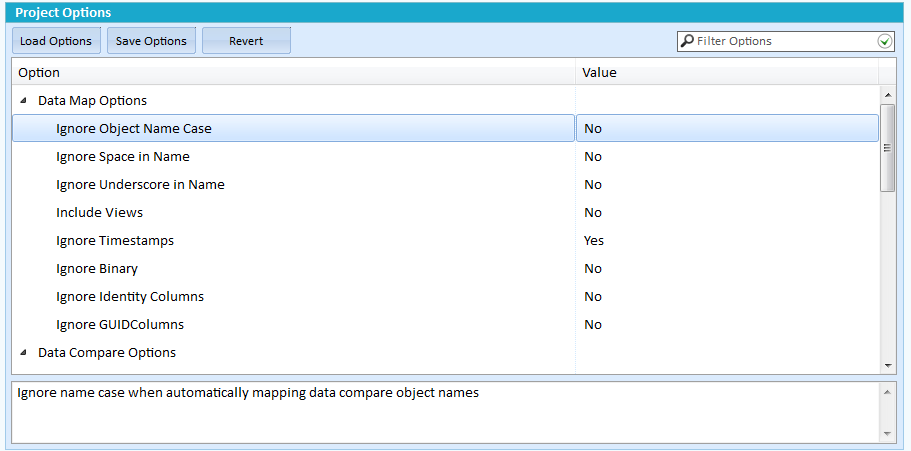
Revert will restore the option to the SQL Delta defaults.
Data Map Options
Ignore Object Name Case |
When mapping objects compare case insensitive names |
Ignore Space in Name |
When mapping objects remove spaces from the name before compare |
Ignore Underscore in Name |
When mapping objects remove and underscore (_) from the name before compare |
Include Views |
Include Views in the table list, this is the same as the project setting Include Views. |
Ignore Timestamps |
Remove columns with the Timestamp data type from the compare and display |
Ignore Binary |
Remove columns with a binary data type from the compare and display |
Ignore Identity Columns |
Remove columns with identity from the compare and display |
Ignore GUID Columns |
Remove columns with the GUID data type from the compare and display |
Data Compare Options
Ignore Case |
Perform case insensitive data compare |
Force Binary Collation |
Use binary collation, case sensitive, when sorting character data overriding any default collation |
Right Trim Columns |
Trim trailing spaces from character data types |
Convert CRLF |
Convert stand-alone 0x10 (Linefeed) and 0x13 (Carriage return) into 0x130x10 during compare. |
Match Null to String |
Match Null to an empty string |
Compress Temp files |
Automatically compress the local data store for identical and different data. |
Convert CLR Data types to Binary |
Convert CLR data types into binary for compare instead of using the ToString() function |
Data Script Options
Disable Foreign Keys |
Within the deployment script and before any updates drop foreign keys that relate to the table. The foreign keys will be re-created at the end of the script. |
Disable Triggers |
Within the deployment script and before any updates drop or disable triggers that relate to the table. The triggers will be re-created at the end of the script. |
Disable Indexes and Constraints |
Within the deployment script and before any updates drop indexes and constraints that relate to the table. The indexes and constraints will be re-created at the end of the script. |
Keep CR and LF |
Leave any stand-alone 0x13 (CR) or 0x10 (LF) values instead of converting to Windows default of 0x130x10 (CRLF) |
Add Comments |
Insert information comments between object script groups |
Add Header Comments |
Add to the start of the script the standard header comments, found below in comments |
Comments |
Define the header comments. Keywords: %Timestamp% = Current DateTime, %ApplyServer% = the server receiving the script (normally the target server), %ApplyDatabase% = the database receiving the script (normally the target database). |
Stop on Errors |
Stop executing the update script when the error count is reached. Enter zero to continue regardless of errors. |
Add Use Database to Script |
Add the Use <database name> clause to the start of the script. |
Add Transactions to Script |
Wrap the data updates in transactions and roll back the updates upon an error. |
Disable Data DDL Triggers |
Disable any DDL triggers. If dropping foreign keys, triggers, indexes or constraints you may wish to disable any DDL triggers. The triggers will be re-enabled at the end of the script. |